How to Create an Automated Yardi Rent Roll with Power BI
Automate your real estate reporting and reduce your rent roll creation time by 80% with Power BI connected to Yardi.

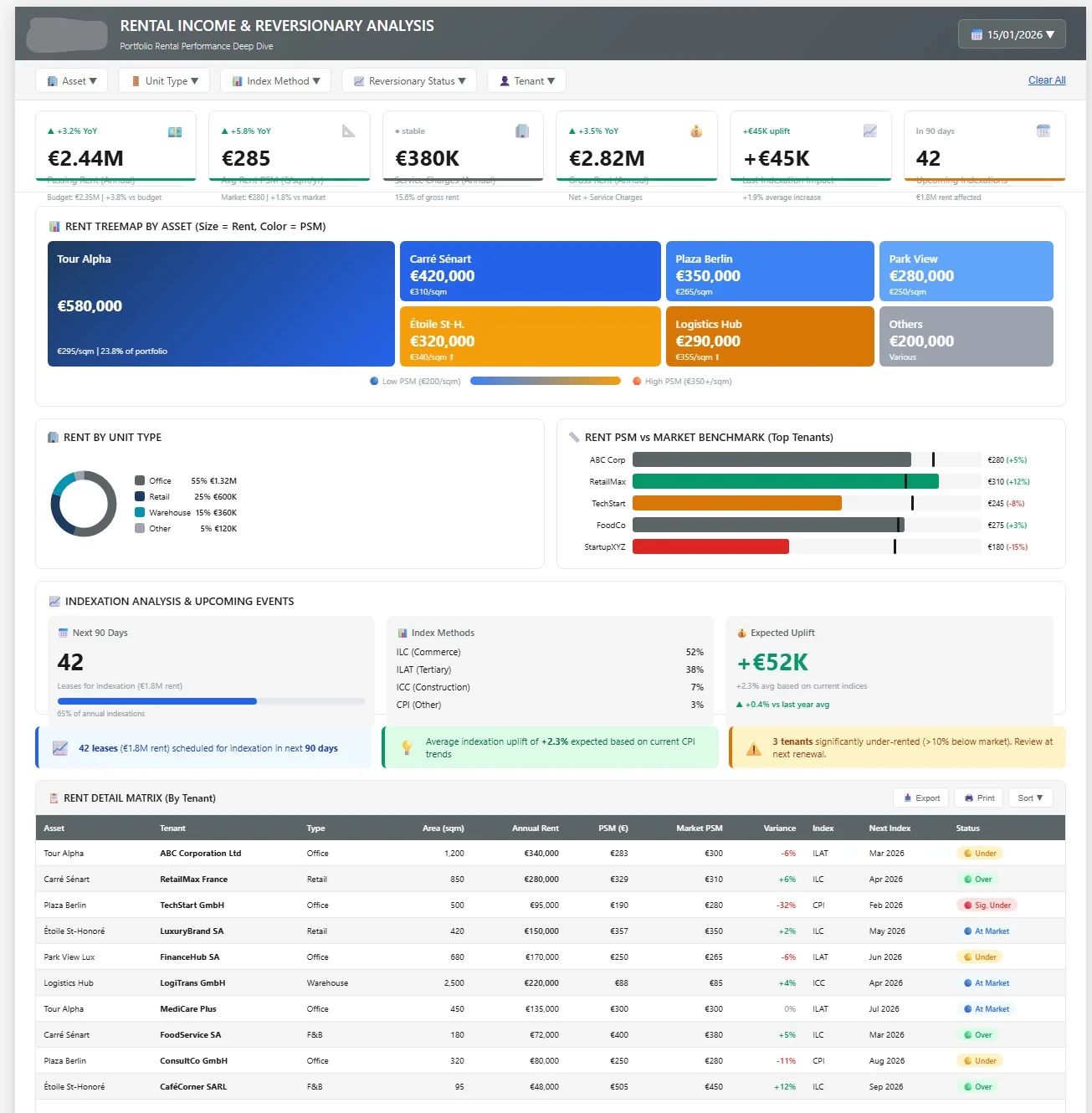
How to Create an Automated Yardi Tenancy schedule with Power BI
In the commercial real estate sector, creating accurate and up-to-date Tenancy schedules represents a major challenge for asset managers and reporting teams. According to a recent real estate industry study, 75% of professionals still spend more than 16 hours per quarter manually compiling their Yardi data to produce a usable Tenancy schedule.
This situation not only generates considerable productivity loss but also exposes organizations to costly error risks. By automating this process with Power BI, it's possible to reduce this time by 80% while improving data quality and reliability.
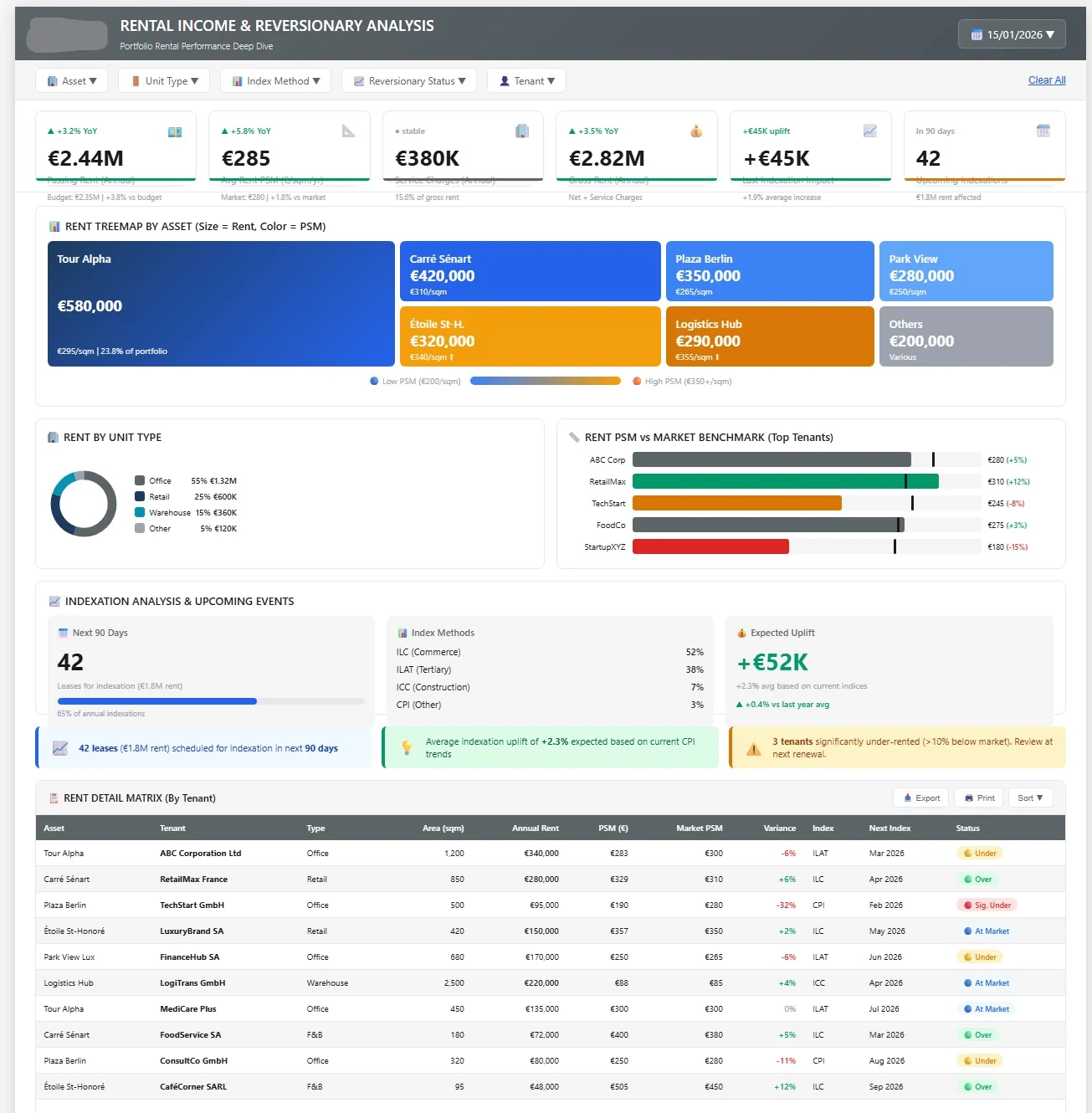
Understanding the Challenges of Modern Real Estate Reporting
Sector-Specific Challenges
Commercial real estate reporting presents unique complexities that far exceed the capabilities of standard Yardi reports. Asset managers face several critical issues:
Multi-currency management represents the first major challenge. In a European context where portfolios span multiple countries, each currency requires specific treatment. Conversions must be tracked, historized, and applied consistently across all reports.
Multi-entity data harmonization also represents a significant challenge. Each subsidiary or legal entity may have its own data entry conventions in Yardi, creating inconsistencies that must be identified and corrected before any consolidation.
Specialized metrics like WALT (Weighted Average Lease Term) or WALB (Weighted Average Lease Break) are not calculated natively by Yardi, forcing teams to develop complex formulas in Excel, a recurring source of errors.
Impact of Current Manual Processes
Traditional Tenancy schedule creation methods generate several issues:
- Excessive processing time: up to 3 full days for a medium-sized portfolio
- Risk of human error: each manual manipulation increases error probability
- Lack of traceability: difficult to trace the origin of a figure or discrepancy
- Publication delays: investors expect real-time data, not quarterly reports
📊 Key Fact: Based on our client analyses, an error in a Tenancy schedule costs an average of 12 hours of work for correction and republication, not counting the impact on credibility with investors.
Technical Architecture: Connecting Your Yardi Data to Power BI
Available Connection Methods
The connection between Yardi and Power BI can be established through several approaches, each adapted to specific contexts:
Direct SQL Server Connection: If your Yardi instance uses SQL Server as the underlying database, Power BI can connect directly. This method offers the advantage of real-time refresh but requires extended access rights and deep understanding of the Yardi data model.
Yardi Voyager API: Yardi provides REST APIs allowing business data extraction. This approach ensures better stability as it respects Yardi's security and validation mechanisms. However, not all data is necessarily exposed via API.
Scheduled Exports: A hybrid solution consists of programming automatic exports from Yardi to a data lake (Azure Data Lake or SharePoint), which Power BI then queries. This method combines implementation simplicity and reliability.
Recommended Architecture
For optimal deployment, we recommend a three-tier architecture:
Yardi Voyager → Azure Data Lake → Power BI Premium
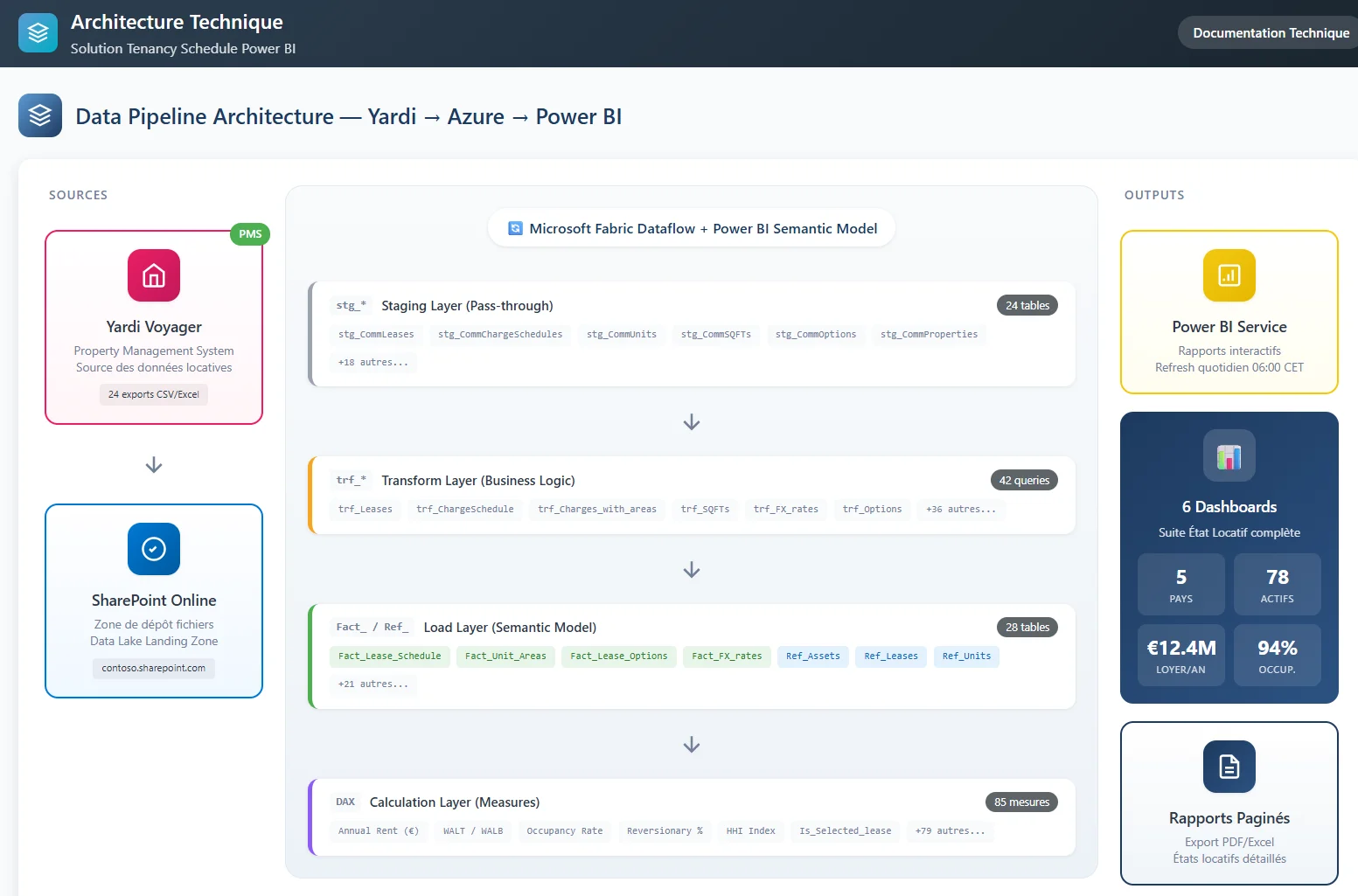
This architecture presents several advantages:
- Decoupling: Power BI doesn't impact Yardi performance
- Historization: preservation of data history for temporal analyses
- Enrichment: ability to add external data (indices, exchange rates)
- Scalability: capacity to handle large data volumes
Data Flow Management
Implementing a robust ETL (Extract, Transform, Load) process is crucial for ensuring data quality. Here are the key steps:
Extraction: Scheduling daily exports from Yardi, ideally at end of day to capture all day's transactions.
Transformation: Data cleaning and standardization via Power Query, including date format management, currency conversion, and label normalization.
Loading: Import of transformed data into the Power BI model with incremental management to optimize performance.
As explained in our guide on Excel to Power BI migration, data source auditing constitutes a fundamental step in this process.
Data Modeling: Structuring Your Real Estate KPIs
Creating the Optimal Data Model
Real estate data modeling in Power BI requires a specific approach to manage the complexity of relationships between leases, tenants, assets, and legal entities.
Recommended Star Schema:
- Central fact table: FactContracts (rents, areas, dates)
- Dimensions: DimAssets, DimTenants, DimEntities, DimTime
This structure, detailed in our article on Power BI star schema modeling, optimizes performance while simplifying DAX calculations.
Essential Dimension Tables
DimTime: Calendar table enriched with real estate specificities (fiscal quarters, revision periods, lease expiries).
DimAssets: Geographic hierarchy (Country > City > Asset) with metadata (area, construction year, asset class).
DimTenants: Tenant information with segmentation (industry sector, financial rating, consolidation group).
DimEntities: Legal structure of the portfolio with reference currencies and historical exchange rates.
History and Version Management
A major challenge in real estate reporting is managing lease amendments and modifications. The model must allow reconstruction of the portfolio state at any date.
SCD Type 2 Approach (Slowly Changing Dimensions): Each lease modification generates a new record with validity start and end dates. This allows navigating through history and comparing successive states.
Report Versioning: Implementation of a version system allowing tracking of modifications and reproducing previously published reports.
This approach avoids recurring problems described in our analysis of Excel reporting errors.
Automation: Creating Dynamic WALT/WALB Calculations
DAX Formulas for Real Estate Metrics
Automated calculation of WALT and WALB indicators represents one of the most complex technical challenges. These metrics require precise weighting and fine date management.
WALT (Weighted Average Lease Term) Calculation:
WALT =
DIVIDE(
    SUMX(
        FILTER(FactContracts, FactContracts[LeaseStatus] = "Active"),
        FactContracts[AnnualRent] *
        DATEDIFF(TODAY(), FactContracts[ExpiryDate], YEAR)
    ),
    CALCULATE(
        SUM(FactContracts[AnnualRent]),
        FactContracts[LeaseStatus] = "Active"
    )
)
WALB (Weighted Average Lease Break) Calculation:
WALB =
VAR ReferenceDate = TODAY()
RETURN
DIVIDE(
    SUMX(
        FILTER(FactContracts,
               FactContracts[LeaseStatus] = "Active" &&
               NOT(ISBLANK(FactContracts[BreakDate]))
        ),
        FactContracts[AnnualRent] *
        DATEDIFF(ReferenceDate, FactContracts[BreakDate], YEAR)
    ),
    CALCULATE(
        SUM(FactContracts[AnnualRent]),
        FactContracts[LeaseStatus] = "Active",
        NOT(ISBLANK(FactContracts[BreakDate]))
    )
)
Managing Renewals and Breaks
Commercial leases often incorporate tacit renewal clauses or early exit options. The model must handle these specificities:
Tacit Renewals: Automatic updating of expiry dates based on notices not given.
Break Options: Differentiated WALB calculation depending on whether the option is likely to be exercised or not.
Rent Reviews: Future rent projection incorporating contractual revisions and indexations.
Multi-Currency Consolidation
Multi-currency portfolio consolidation requires a methodical approach:
Exchange Rate Management:
RentEUR =
SWITCH(
    FactContracts[LeaseCurrency],
    "EUR", FactContracts[LocalRent],
    "GBP", FactContracts[LocalRent] * RELATED(ExchangeRates[EUR_GBP]),
    "USD", FactContracts[LocalRent] * RELATED(ExchangeRates[EUR_USD]),
    BLANK()
)
This multi-source consolidation issue is also addressed in our guide on financial data integration.
Interactive Dashboard: Designing the Ideal User Interface
Design Principles for Real Estate Reporting
Designing an effective Tenancy schedule dashboard relies on several fundamental principles adapted to real estate professionals' needs.
Information Hierarchy: The interface must allow intuitive navigation from global to detail. A user must be able to start from a portfolio view and drill down to individual lease level in just a few clicks.
Temporal Contextualization: Real estate data evolves over time. The dashboard must offer temporal comparison capabilities (current vs. previous year) and projection (future portfolio state).
Visual Alerts: Automatic highlighting of situations requiring particular attention (upcoming expiries, high vacancy rates, payment delays).
Recommended Dashboard Structure
Executive Summary Page: Consolidated portfolio KPIs with quarterly evolution. This view must answer management questions in less than 30 seconds.
Country/Fund Analysis Page: Geographic drill-down with performance comparisons and local trend identification.
Asset Detail Page: Operational view allowing fine analysis of a building with lease lists, schedules, and alerts.
Projection Page: Scenario simulation and impact of management decisions on key metrics.
User Experience Optimization
Adoption of a new reporting system largely depends on its ergonomics. Several best practices apply:
Consistent Navigation: Same navigation logic on all pages, with breadcrumb and return buttons.
Contextual Filters: Slicers adapted to each page's content, with selection memorization during navigation.
Optimized Response Times: Use of DAX optimization techniques to guarantee response times under 3 seconds.
Data quality principles detailed in our article on data quality importance particularly apply to this context.
Deployment: Production Implementation and Team Training
Progressive Deployment Strategy
Migration to an automated system must be carried out progressively to minimize risks and maximize user adoption.
Pilot Phase: Deployment on a portfolio subset (one country or fund) for 1-2 quarters. This phase validates data consistency and identifies necessary adjustments.
Parallel Phase: Simultaneous production of old and new reporting during a transition period, allowing verification of concordance and reassuring users.
Switch Phase: Progressive stopping of old processes once confidence is established in the new system.
Training and Change Management
Success of a reporting digitalization project largely depends on team appropriation. A structured training plan must cover:
Functional Training: Understanding new indicators and their calculation methods. Users must be able to explain differences from old reports.
Technical Training: Dashboard usage, custom report creation, filter management, and data navigation.
Ongoing Support: Implementation of internal hotline and regular refresher sessions to maintain skill levels.
This approach is inspired by best practices exposed in our guide on reporting automation.
Governance and Maintenance
An automated reporting system requires adapted governance to maintain its reliability over time.
Quality Controls: Implementation of automated tests verifying data consistency at each refresh. Automatic alerts for significant discrepancies.
Evolution Management: Validation process for data model modifications and impact on existing reports.
Documentation: Maintenance of up-to-date technical and functional documentation, including calculation rules and data sources.
ROI Measurement and Continuous Optimization
Project success evaluation must rely on objective metrics:
Productivity Gains: Measurement of time saved on report production (target: -80%).
Quality Improvement: Reduction in number of errors detected and corrections needed.
User Satisfaction: Regular surveys among teams and report recipients.
Responsiveness: Ability to respond to investor ad-hoc requests within reduced timeframes.
Expected ROI and Operational Benefits
Benefits Quantification
Tenancy schedule automation generates quantifiable benefits across several dimensions:
Direct Time Savings:
- Reduction from 16-20h to 3-4h per quarterly Tenancy schedule
- Annual savings: 52-64h of highly qualified work
- Financial valuation: €5,000 to €8,000 savings per year
Responsiveness Gains:
- Response to investor requests in minutes instead of several days
- Real-time analysis capability for management decisions
- Measurable client satisfaction improvement
Risk Reduction:
- Elimination of manual entry and calculation errors
- Complete data and calculation traceability
- Guaranteed consistency between different reports
💡 Client Feedback: A European asset manager managing €2.5B in assets reduced Tenancy schedule production time by 75% while improving investor satisfaction by 40% thanks to more reliable and up-to-date data.
Service Quality Impact
Beyond operational gains, automation transforms the investor relationship:
Enhanced Proactivity: Ability to anticipate questions and provide complementary analyses.
Increased Credibility: Elimination of recurring errors that damage trust.
Service Innovation: Possibility to offer new types of analyses and personalized reports.
This transformation is part of a broader approach to financial process modernization, as described in our analysis on Power BI collaboration optimization.
Related Articles
To deepen your understanding of real estate reporting automation, also consult:
- Migrating Your Reports from Excel to Power BI: Data Source Audit is a Key Step
- Power BI: Master All Joins in Power Query
Creating an automated Tenancy schedule represents much more than simple technological modernization. It's a transformation that allows teams to focus on their core business: analysis and asset management, rather than manual data compilation.
With Power BI connected to your Yardi data, you have a powerful tool to significantly improve your productivity while strengthening investor confidence through more reliable and responsive reports.
The initial investment in this transformation pays for itself quickly through time savings and service quality improvement. More importantly, this approach positions you to meet the market's growing requirements for transparency and responsiveness in real estate reporting.
Newsletter
1 email per month, no spam
Receive my latest articles on Power BI, automation and data directly in your inbox.