How to Import Financial Data into Microsoft Fabric: Methods and Best Practices
Discover how Microsoft Fabric is revolutionizing data ingestion for finance teams. Learn to choose the right tools like Data Flows, data pipelines, and notebooks.

Microsoft Fabric offers several methods for importing your financial data. Whether you work with Excel files, ERP databases, or APIs, this guide helps you choose the best approach.
Ingestion Methods in Microsoft Fabric
1. Dataflows Gen2
Dataflows Gen2 are perfect for non-technical users who want to import and transform data via a visual interface.
Ideal use case:
- Importing Excel or CSV files from SharePoint
- Simple transformation of accounting data
- Creating reference tables (chart of accounts, cost centers)
Dataflows Gen2 are based on Power Query, so if you already master Power Query in Excel or Power BI, you'll be up and running quickly.
2. Data Pipelines
Pipelines offer more control and allow orchestration of complex workflows.
Ideal use case:
- Import from ERPs (SAP, Oracle, Dynamics)
- Scheduled loads with dependencies
- Processing large data volumes
3. Notebooks (Python/Spark)
For technical teams, notebooks offer maximum flexibility.
Ideal use case:
- Complex transformations with Python/Pandas
- Financial API integration
- Advanced statistical calculations
4. Shortcuts
Shortcuts allow access to external data without copying it.
Ideal use case:
- Accessing Azure Data Lake data
- Connecting to data shared between teams
- Reducing storage costs
Import from Common Financial Sources
Excel and Flat Files
Source → OneLake → Dataflow Gen2 → Lakehouse
- Drop your Excel files into OneLake
- Create a Dataflow Gen2 to transform the data
- Load into a Lakehouse table
SAP and ERP
Source → Pipeline (Copy Activity) → Lakehouse → Transformation
- Configure the SAP connector in the pipeline
- Schedule daily extraction
- Transform with a notebook or Dataflow
Banking and Financial APIs
API → Notebook (requests) → DataFrame → Lakehouse
- Use Python to call the API
- Parse the JSON response
- Load into a Delta table
Best Practices for Financial Data
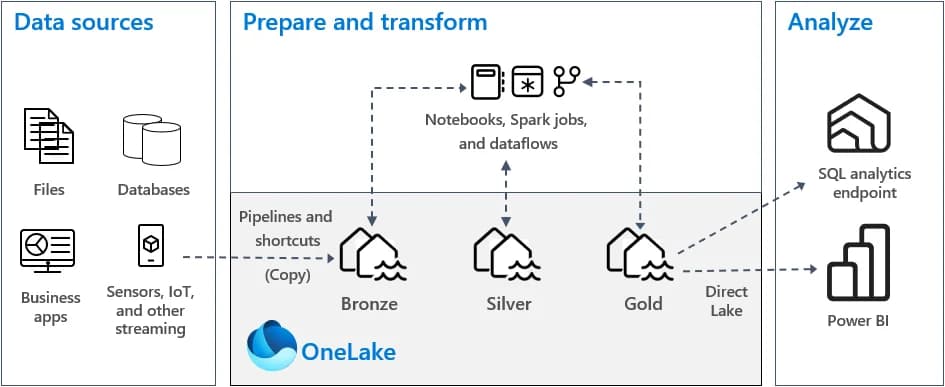
1. Bronze/Silver/Gold Separation
Organize your data in layers:
- Bronze: Raw data, exactly as received
- Silver: Cleaned and validated data
- Gold: Aggregated data ready for analysis
2. Accounting Period Management
Make sure to properly manage:
- Closing dates
- Inter-period adjustments
- Restatements
3. Reconciliation Controls
Implement automatic controls:
- Control totals between source and destination
- Accounting balance validation
- Alerts in case of discrepancy
Never delete source data (Bronze). In case of problems, you must be able to reload from raw data.
4. Security and Compliance
For sensitive financial data:
- Use Row-Level Security (RLS)
- Enable access auditing
- Encrypt sensitive data
Comparison Table of Methods
| Method | Complexity | Volume | Real-time | Usage | |--------|------------|--------|-----------|-------| | Dataflows Gen2 | Low | Medium | No | Simple transformations | | Pipelines | Medium | High | No | Complex orchestration | | Notebooks | High | High | Possible | Advanced calculations | | Shortcuts | Low | High | Yes | Direct access |
Example: Monthly Accounting Data Import
Here's a typical workflow for closing data import:
- Day-1 of closing: Automatic extraction from ERP
- Transformation: Data cleaning and validation
- Controls: Reconciliation with trial balances
- Publication: Made available in Power BI
- Notification: Teams alert to users
Conclusion
Microsoft Fabric offers the flexibility needed to handle all your financial data import use cases. Choose the method adapted to your context and implement appropriate controls to ensure the reliability of your analyses.
Need help configuring your data imports? Book a free consultation
Newsletter
1 email per month, no spam
Receive my latest articles on Power BI, automation and data directly in your inbox.