The Impact of Power BI and Microsoft Fabric Pricing Strategy on Enterprise Costs
Discover how Microsoft Fabric and Power BI are revolutionizing pricing and data analytics, and how to leverage them to optimize your costs.


Understanding Microsoft's pricing strategy for Power BI and Fabric is essential for optimizing your data investments. This guide analyzes the different models and helps you make the right choices.
The Evolution of Microsoft's Pricing Model
Microsoft has evolved its pricing approach with the arrival of Fabric:
- Before: Power BI licenses per user (Pro, Premium Per User)
- Now: Shared capacities (Fabric) + user licenses
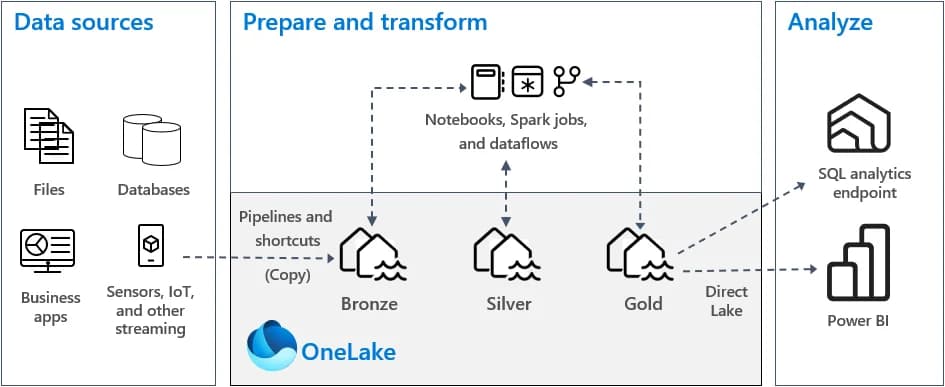
Microsoft Fabric unifies billing for the entire data stack under a capacity model (F SKUs), simplifying cost management.
Power BI Licensing Options
Power BI Free
- Price: Free
- Limits: No sharing, no collaboration
- Usage: Personal exploration
Power BI Pro
- Price: ~$10/user/month
- Includes: Sharing, collaboration, apps
- Usage: Teams up to 500 users
Power BI Premium Per User (PPU)
- Price: ~$20/user/month
- Includes: Pro + advanced features (paginated reports, AI)
- Usage: Power users, advanced analysts
Power BI Premium (capacity)
- Price: Starting at ~$5,000/month
- Includes: Dedicated capacity, no user limits
- Usage: Enterprises, wide distribution
The Fabric Model
Fabric Capacities (F SKUs)
| SKU | CUs | Estimated Monthly Price | Usage | |-----|-----|-------------------------|-------| | F2 | 2 | ~$250 | Dev/Test | | F4 | 4 | ~$500 | Small team | | F8 | 8 | ~$1,000 | SME | | F16 | 16 | ~$2,000 | Mid-size | | F32+ | 32+ | ~$4,000+ | Large enterprises |
Pay-as-you-go
Fabric also offers a consumption-based model:
- Billing per CU hour used
- Ideal for variable workloads
- No minimum commitment
For projects with peak loads (e.g., monthly closings), pay-as-you-go mode can be more economical.
Scenario Comparison
Scenario 1: SME (50 users)
| Option | Monthly Cost | |--------|--------------| | 50 Pro licenses | $500 | | 50 PPU licenses | $1,000 | | Fabric F4 + Pro viewers | ~$550 |
Recommendation: Fabric F4 if advanced features are needed
Scenario 2: Mid-size Company (200 users)
| Option | Monthly Cost | |--------|--------------| | 200 Pro licenses | $2,000 | | Premium P1 | ~$5,000 | | Fabric F8 | ~$1,000 |
Recommendation: Fabric F8 if using data engineering
Scenario 3: Large Enterprise (1000+ users)
At this scale, the capacity model becomes systematically more advantageous. Negotiate enterprise agreements (EA) for significant discounts.
Optimizing Your Costs
1. Analyze Your Actual Consumption
- How many monthly active users?
- What types of content do they consume?
- Are there peak loads?
2. Segment Your Users
- Creators: Pro or PPU licenses
- Consumers: Access via capacity (Free)
- Occasional users: Pay-as-you-go
3. Use the Right Features
- Aggregations to reduce consumption
- Incremental refresh to optimize refreshes
- Composite models to balance sources
4. Avoid Over-provisioning
- Start small, scale up
- Use monitoring to adjust
- Take advantage of trial periods
Don't provision an F32 capacity "just in case." Start with F2/F4 and observe your actual consumption.
Impact on IT Budgets
Direct Costs
- User licenses
- Fabric capacities
- Additional storage (beyond quotas)
Indirect Costs to Consider
- Team training
- Development time
- Support and maintenance
- Data migration
Expected ROI
Companies that switch to Fabric typically see:
- 30-50% reduction in licensing costs vs traditional model
- Productivity gains for data teams
- Tool consolidation (fewer third-party licenses)
Budget Checklist
- [ ] Inventory of current licenses
- [ ] Number of users by category
- [ ] Estimated Fabric needs
- [ ] Scenario comparison
- [ ] Training budget included
- [ ] Margin for scaling
Conclusion
Microsoft's pricing strategy with Fabric offers more flexibility but requires careful analysis of your needs. Take time to model different scenarios before committing.
Proper initial sizing will save you surprises and optimize your data investments.
Need help optimizing your Power BI/Fabric costs? Book a free consultation
Newsletter
1 email per month, no spam
Receive my latest articles on Power BI, automation and data directly in your inbox.